Introduction
Telehealth and telemedicine have transformed modern clinical care by enabling patients to consult licensed healthcare professionals from the comfort of their home or workplace. Whether you are discussing routine lab results, checking in for a chronic condition follow-up, or seeking advice on a minor illness, virtual visits offer significant convenience and accessibility.Educational platforms like MYDOCTORSNOW help patients research healthcare topics, explore consultation options, and understand the wide spectrum of clinical services available today. Using structured preparation guidelines allows patients to partner effectively with their physicians and make every minute of their virtual consultation count.
What Is a Telehealth Consultation?
A telehealth consultation is a remote clinical encounter between a patient and a licensed healthcare professional using telecommunications technology. As outlined by the U.S. Department of Health and Human Services (HHS), telehealth encompasses a broad range of technologies and modalities designed to deliver clinical care at a distance.
Common Telehealth Formats:
- Synchronous Video Consultations: Real-time, interactive audiovisual appointments conducted via secure, HIPAA-compliant medical video platforms.
- Audio-Only (Telephone) Appointments: Real-time voice conversations used when video access is technically unavailable or when a visual assessment is clinically unnecessary.
- Asynchronous Secure Messaging (Store-and-Forward): Transmitting photos, symptom logs, or medical records through encrypted patient portals for clinical review and response.
- Remote Patient Monitoring (RPM): Using digital medical devices (such as cellular blood pressure cuffs or continuous glucose monitors) that automatically transmit clinical readings to your healthcare team.
During a virtual appointment, a clinician can take a detailed medical history, evaluate visible symptoms, review diagnostic reports, discuss therapeutic options, adjust existing medications, and determine whether in-person care or testing is needed.
When Is Telehealth Most Useful?
Telehealth serves as a convenient, effective point of care for a wide range of non-emergency medical needs:
                      ┌───────────────────────────────────────┐
                      │    Common Uses for Virtual Care       │
                      └──────────────────┬────────────────────┘
                                         │
     ┌──────────────────┬────────────────┼────────────────┬──────────────────┐
     ▼                  ▼                ▼                ▼                  ▼
┌──────────┐     ┌─────────────┐  ┌─────────────┐  ┌─────────────┐    ┌─────────────┐
│ Chronic  │     │ Review of   │  │ Behavioral  │  │ Minor Acute │    │ Prescription│
│ Disease  │     │ Lab & Imaging│ │ & Mental    │  │ Illnesses   │    │ Titration & │
│ Check-ins│     │ Reports     │  │ Health Care │  │ (Colds/Rash)│    │ Maintenance │
└──────────┘     └─────────────┘  └─────────────┘  └─────────────┘    └─────────────┘
- Routine Chronic Condition Follow-Ups: Regular management visits for stable hypertension, hypothyroidism, Type 2 diabetes, or mild asthma.
- Diagnostic Test Reviews: Reviewing recent routine blood panels, cholesterol profiles, or screening radiology reports.
- Mental and Behavioral Health: Individual therapy, psychiatric follow-ups, cognitive behavioral counseling, and medication management.
- Minor Acute Conditions: Initial triage and guidance for mild upper respiratory symptoms, seasonal allergies, uncomplicated insect bites, or mild skin rashes.
- Post-Procedure Checks: Routine check-ins after minor outpatient procedures to review recovery milestones and discuss wound care.
- Preventive Counseling: Guidance on smoking cessation, dietary modifications, sleep hygiene, and general lifestyle adjustments.
When Telehealth Is Not Appropriate: Recognizing Emergencies
While virtual consultations offer immense convenience, they cannot replace emergency medical services or acute physical examinations.
🚨 DO NOT SCHEDULE A ROUTINE TELEHEALTH VISIT FOR EMERGENCY SYMPTOMS 🚨

Seek immediate emergency medical care (call emergency services or visit the nearest
emergency room) if you experience:
• Acute, crushing chest pain, pressure, or tightness radiating to the arm/jaw.
• Severe shortness of breath, respiratory distress, or choking.
• Sudden onset of weakness, numbness, facial drooping, or speech difficulty (Stroke signs).
• Sudden loss of consciousness, fainting, or acute severe confusion.
• Uncontrolled bleeding or major traumatic injury.
• Signs of severe anaphylaxis (swelling of lips, tongue, throat, or wheezing).
• Sudden, severe abdominal pain or coughing/vomiting blood.
If your symptoms are severe, rapidly worsening, or potentially life-threatening, seek emergency care immediately rather than waiting for a virtual appointment.
Comprehensive Telehealth Consultation Checklist
Use this printable checklist to prepare for your appointment:
- Appointment Details: Date, exact time, and timezone confirmed.
- Device Ready: Smartphone, tablet, or computer fully charged or plugged in.
- Software Updated: Necessary video app or web browser installed and updated.
- Connection Tested: Wi-Fi or cellular data verified for stability.
- Audio & Video Checked: Camera lens wiped clean; microphone and speakers tested.
- Quiet Location: Private room selected with minimal background noise.
- Lighting Arranged: Light source positioned in front of your face, not behind.
- Symptom Log Ready: Timeline, severity, and triggers written down.
- Medication List Compiled: Names, dosages, and frequencies documented.
- Medical Records Accessible: Recent lab tests, imaging, or specialist notes nearby.
- Vitals Recorded: Recent blood pressure, pulse, temperature, or weight noted if available.
- Questions Written Down: Top 3 to 5 priorities listed clearly.
- Notepad & Pen at Hand: Ready to write down instructions and next steps.
- ID & Insurance Card: Available if verification is requested.
- Backup Plan Known: Clinic phone number saved in case the digital link drops.
How to Organize Your Symptoms Before the Visit
During a telehealth visit, your verbal description of your symptoms is the clinician’s primary diagnostic tool. Organizing your thoughts beforehand ensures you communicate the key clinical details accurately.
┌─────────────────────────────────────────────────────────────────────────────┐
│                    The "OLD CHARTS" Symptom Framework                       │
├───────────────────────────────────┬─────────────────────────────────────────┤
│ Onset (When did it start?)        │ • Exact day, time, or sudden vs gradual │
├───────────────────────────────────┼─────────────────────────────────────────┤
│ Location (Where is it?)           │ • Precise anatomical area & radiation   │
├───────────────────────────────────┼─────────────────────────────────────────┤
│ Duration (How long does it last?) │ • Constant, intermittent, or in waves   │
├───────────────────────────────────┼─────────────────────────────────────────┤
│ Character (What does it feel like?)│ • Sharp, dull, throbbing, burning, etc. │
├───────────────────────────────────┼─────────────────────────────────────────┤
│ Aggravating / Relieving Factors   │ • What makes it better or worse?        │
├───────────────────────────────────┼─────────────────────────────────────────┤
│ Radiation (Does it spread?)       │ • Moves from back to groin, neck, etc.  │
├───────────────────────────────────┼─────────────────────────────────────────┤
│ Timing (When does it occur?)      │ • Worse in morning, night, after meals  │
├───────────────────────────────────┼─────────────────────────────────────────┤
│ Severity (Scale of 1 to 10)       │ • Impact on daily activities and sleep  │
└───────────────────────────────────┴─────────────────────────────────────────┘
Be prepared to share any home remedies or over-the-counter medications you have tried and whether they provided temporary relief.
Compiling an Accurate Medication List
Medication reconciliation is an essential component of every clinical encounter. Having an organized, up-to-date medication list prevents drug interactions and ensures safe prescribing:
- Prescription Medications: Note the exact brand/generic name, strength (e.g., 20 mg), dosage form (tablet, capsule, inhaler), and how many times per day you take it.
- Over-the-Counter Drugs: Include pain relievers, allergy pills, antacids, or sleep aids you take regularly or intermittently.
- Dietary & Herbal Supplements: Note all daily multivitamins, mineral supplements (e.g., iron, calcium), and botanical extracts (e.g., St. John’s Wort, Ashwagandha), as these can interact with prescription drugs.
- Known Allergies & Adverse Reactions: List any allergies to medications (e.g., penicillin, sulfa), foods, or latex, noting the specific reaction you experienced (e.g., hives, facial swelling, nausea).
Tip: If you do not have time to write out a list, gather your actual medication bottles in a small basket next to your computer or phone so you can read labels directly to your doctor.
Gathering Medical Records and Recent Test Results
Having relevant clinical documentation at your fingertips saves valuable consultation time and provides necessary context for your provider:
- Recent Laboratory Panels: Blood tests, lipid panels, HbA1c readings, or urinalysis completed within the last 6 to 12 months.
- Radiology & Imaging Reports: Summary reports from recent X-rays, ultrasounds, CT scans, or MRIs.
- Specialist Consultation Letters: Summary notes from previous visits with cardiologists, endocrinologists, dermatologists, or surgeons.
- Hospital Discharge Summaries: Documentation from any recent emergency room visits or inpatient stays.
If your telehealth platform allows document uploads prior to the call, upload these files through the secure patient portal several hours before your scheduled appointment time.
Preparing Your Past Medical and Family History
Your personal health background and family history provide essential clues that help your clinician evaluate your current symptoms:
- Past Medical Diagnoses: Chronic conditions such as asthma, high blood pressure, diabetes, acid reflux, or thyroid disease.
- Surgical History: Previous surgeries, hospitalizations, or major procedures, including approximate dates.
- Family Medical History: Major health conditions affecting first-degree relatives (parents, siblings, children), such as early cardiovascular disease, stroke, diabetes, or cancer.
- Lifestyle Factors: Regular physical activity habits, dietary patterns, occupational exposures, and current or past tobacco, alcohol, or recreational substance use.
Testing Your Technology and Connectivity
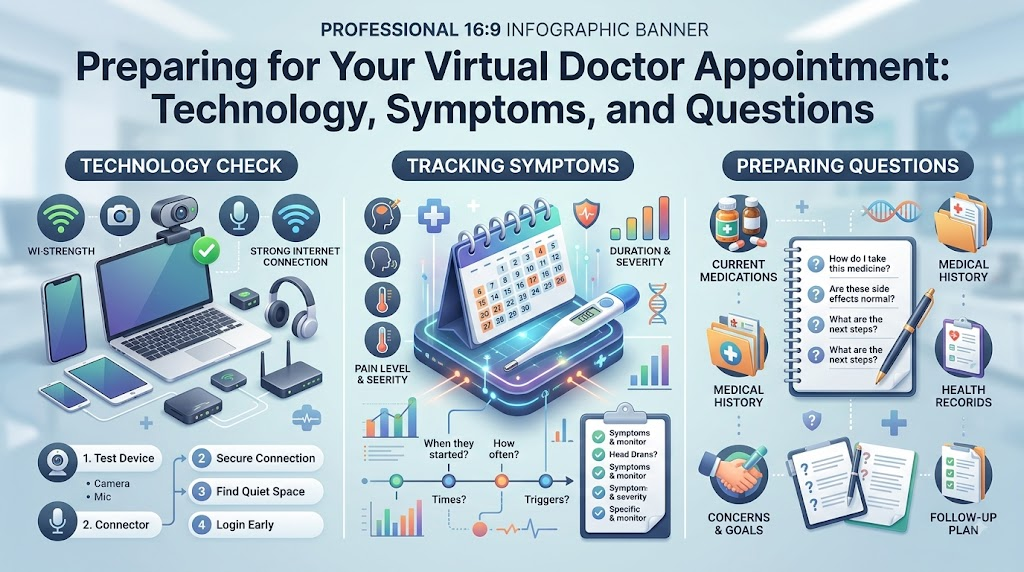
Technical glitches can disrupt a consultation and waste valuable appointment time. Complete a thorough technology check 15 to 30 minutes before your scheduled start time:
┌─────────────────────────────────────────────────────────────────────────────┐
│                         Technical Setup Checklist                           │
├──────────────────────┬────────────────────────┬─────────────────────────────┤
│ Hardware             │ Software & Network     │ Environment                 │
├──────────────────────┼────────────────────────┼─────────────────────────────┤
│ • Charge device to   │ • Connect to reliable  │ • Set up in a well-lit space│
│   >50% or plug in    │   high-speed Wi-Fi     │ • Place light in front of   │
│ • Clean camera lens  │ • Update browser or app│   your face, not behind     │
│ • Test microphone &  │ • Close background apps│ • Minimize background noise │
│   external headset   │ • Allow audio/video    │ • Position device securely  │
│ • Use laptop/stand   │   device permissions   │   on a table (avoid shaking)│
└──────────────────────┴────────────────────────┴─────────────────────────────┘
- Device Stability: Set your laptop, tablet, or smartphone on a solid table or desk stand rather than holding it in your hand to prevent camera shaking.
- Camera Angle & Framing: Position your camera at eye level so your head, neck, and upper shoulders are clearly visible in the video frame.
- Audio Optimization: Using a pair of wired or wireless headphones with a built-in microphone significantly reduces room echo, feedback, and background noise.
- Backup Phone Plan: Ensure your current mobile phone number is on file with the clinic so your provider can call you directly if the video platform disconnects.
Choosing a Private and Secure Location
Medical discussions often involve sensitive, personal information. Choosing the right environment protects your privacy and helps you focus on the conversation:
- Select a Quiet, Private Room: Choose a closed room where family members, roommates, or coworkers cannot overhear your conversation.
- Avoid Public Spaces: Never conduct a telehealth consultation from coffee shops, public transit, shared office spaces, or while driving a vehicle.
- Manage Distractions: Mute television sets, turn off loud appliances, close windows facing noisy traffic, and arrange care for active pets during your call.
- Ensure Adequate Lighting: Face a window or lamp so your face is brightly and evenly illuminated, which is essential if your clinician needs to inspect your throat, skin, or eyes.
Preparing Your Clinical Questions
Writing down your primary questions in advance ensures you cover your most important concerns without forgetting key details.
15 Practical Questions to Consider Asking:
- What do you suspect is causing my current symptoms?
- Is a virtual evaluation sufficient for my symptoms, or do I need an in-person physical exam?
- Are there any diagnostic laboratory tests, cultures, or imaging studies I should complete?
- What specific warning signs or symptoms should prompt me to seek urgent in-person medical care?
- What treatment options do you recommend, and what are their potential benefits and side effects?
- How soon should I reasonably expect to see an improvement in my symptoms?
- Do I need to adjust or stop any of my current prescription or over-the-counter medications?
- Are there specific lifestyle, dietary, or activity modifications that will help my recovery?
- What parameters (e.g., blood pressure, temperature, glucose) should I track at home?
- Do I need a formal referral to a medical specialist for further evaluation?
- How will I receive my prescription, and which pharmacy will it be sent to?
- When and how should we schedule a follow-up consultation to assess my progress?
- How can I reach your office if my symptoms do not improve as expected?
- Will a summary of today’s clinical notes be available in my secure patient portal?
- If my condition worsens over the weekend, what specific steps should I take?
What to Expect During the Virtual Visit
Understanding the flow of a standard telehealth consultation helps you feel comfortable and prepared throughout the call:
┌─────────────────────────────────────────────────────────────────────────────┐
│                      Typical Telehealth Consultation Flow                   │
└──────────────────────────────────────┬──────────────────────────────────────┘
                                       ▼
  [Step 1] Virtual Check-In: Click link, verify identity, & confirm location.
                                       ▼
  [Step 2] Clinical Interview: Discuss chief complaint & symptom history.
                                       ▼
  [Step 3] History & Medication Review: Confirm current drugs & allergies.
                                       ▼
  [Step 4] Visual & Guided Assessment: Inspect visible signs / self-exam.
                                       ▼
  [Step 5] Assessment & Discussion: Doctor explains diagnosis & findings.
                                       ▼
  [Step 6] Treatment Plan & Wrap-Up: Review prescriptions, tests, & follow-up.
- Virtual Check-In: Logging into the portal, testing device permissions, and confirming your identity and current physical address (required for clinical licensing and emergency safety).
- Clinical Interview: Explaining your main reason for the visit, describing symptom onset, and answering diagnostic questions.
- Medical & Medication Review: Confirming your current prescription list, allergies, and recent health changes.
- Visual & Functional Assessment: The doctor may inspect visible skin lesions, observe your breathing pattern, look at your throat, or guide you through simple mobility checks.
- Assessment & Plan Formulation: The clinician shares their clinical impressions, explains treatment options, and discusses potential diagnoses.
- Wrap-Up & Follow-Up: Reviewing prescriptions sent electronically, scheduling necessary lab work, and confirming follow-up timelines.
What a Clinician Can and Cannot Assess Remotely
Understanding the boundaries of virtual medicine helps set realistic expectations for your visit:
| Clinical Area | What Telehealth Can Accomplish | What Requires In-Person Care |
| Physical Examination | Visual inspection of skin rashes, external eye redness, throat appearance, range of motion. | Auscultation of heart/lung sounds, abdominal palpation, internal ear (otoscopic) exam, pelvic/rectal exams. |
| Diagnostics & Vitals | Review of patient-reported home blood pressure, blood glucose, temperature, pulse oximetry. | In-office ECG, immediate blood draws, formal spirometry, high-resolution radiology imaging. |
| Therapeutics & Care | Prescribing non-controlled medications, refilling maintenance therapies, lifestyle counseling. | Injections, wound debridement, joint aspirations, suturing, physical physical therapy maneuvers. |
| Triage & Follow-Up | Assessing symptom progression, monitoring treatment response, determining need for specialist care. | Managing acute unstable vital signs, severe trauma, acute surgical emergencies. |
Privacy, Security, and Data Protection
Protecting personal health information is an essential part of telemedicine. Reputable healthcare providers use secure platforms to safeguard patient data:
- Use Dedicated Medical Portals: Connect exclusively through the official, encrypted telehealth platforms provided by your clinic or hospital system rather than unencrypted consumer messaging apps.
- Secure Your Device: Ensure your smartphone, tablet, or laptop is protected with a secure password, PIN, or biometric lock, and keep operating systems updated with the latest security patches.
- Avoid Unsecured Public Wi-Fi: Conduct virtual medical visits over a secure, password-protected home network or encrypted cellular connection rather than open public Wi-Fi networks.
- Guard Login Credentials: Never share your patient portal usernames or passwords with unauthorized individuals.
Preparing Children or Older Adults for Telehealth
Assisting family members requires tailored preparation to ensure a smooth, low-stress appointment:
┌─────────────────────────────────────────────────────────────────────────────┐
│                         Special Population Guidance                         │
├───────────────────────────────────┬─────────────────────────────────────────┤
│ For Pediatric Visits (Children)   │ • Ensure a parent or legal guardian is  │
│                                   │   present throughout the visit          │
│                                   │ • Have favorite quiet toys nearby to    │
│                                   │   keep the child calm and engaged       │
│                                   │ • Note recent body weight (essential for│
│                                   │   accurate pediatric medication dosing) │
├───────────────────────────────────┼─────────────────────────────────────────┤
│ For Geriatric Visits (Seniors)    │ • Have a trusted caregiver or family    │
│                                   │   member assist with technology         │
│                                   │ • Use a larger screen (tablet or laptop)│
│                                   │   and ensure hearing aids are in place  │
│                                   │ • Keep a clear, printed list of current │
│                                   │   medications directly in front of them │
└───────────────────────────────────┴─────────────────────────────────────────┘
Obtaining Home Health Measurements
If you own home monitoring devices, gathering your readings right before your appointment provides valuable clinical context for your physician:
- Body Temperature: Take your temperature with a reliable digital thermometer if you feel feverish or unwell.
- Blood Pressure and Resting Heart Rate: Rest quietly in a seated position for 5 minutes before taking a reading with an upper-arm automated blood pressure cuff.
- Body Weight: Weigh yourself in the morning using a reliable scale, especially if managing conditions like heart failure or kidney disease.
- Blood Glucose: Check your fasting or post-meal blood sugar levels if you are managing diabetes.
- Pulse Oximetry: Measure your blood oxygen saturation ($SpO_2$) if you have a finger pulse oximeter and are discussing respiratory symptoms.
Note: Only report readings obtained from reliable, validated home devices. You do not need to purchase specialized medical equipment unless specifically advised by your doctor.
Tips for Clear and Effective Communication
Effective communication is key to getting the most out of your virtual visit:
- Be Direct and Specific: State your primary health concern in the first two minutes of the consultation so your doctor understands your main priority.
- Speak Clearly and at a Normal Pace: Digital audio can compress speech; speaking at a moderate pace helps ensure the provider hears all details clearly.
- Do Not Withhold Information: Be honest about medication adherence, lifestyle habits, and symptoms, even if uncomfortable.
- Clarify Unfamiliar Medical Terms: If your clinician uses medical jargon or gives complex instructions, ask them to explain or repeat the information in simpler terms.
- Summarize the Action Plan: Before the call ends, briefly summarize your understanding: “So, I will start this new medication tomorrow morning, schedule my blood test for next Thursday, and book a follow-up visit in three weeks. Is that correct?”
What to Do After Your Telehealth Consultation
A successful telehealth encounter concludes with structured post-visit actions:
┌─────────────────────────────────────────────────────────────────────────────┐
│                        Post-Consultation Action Plan                        │
└──────────────────────────────────────┬──────────────────────────────────────┘
                                       ▼
  [Step 1] Review and organize your handwritten or digital consultation notes.
                                       ▼
  [Step 2] Confirm prescriptions have been routed to your preferred pharmacy.
                                       ▼
  [Step 3] Schedule required lab work, diagnostic imaging, or in-person visits.
                                       ▼
  [Step 4] Access the patient portal to review and download the clinical summary.
                                       ▼
  [Step 5] Monitor your symptoms and contact the clinic if your health changes.
How to Choose a Telehealth Provider
When selecting a virtual healthcare provider or platform, consider these core markers of clinical quality:
- Verified Medical Credentials: The platform is staffed by board-certified physicians, nurse practitioners, or physician assistants licensed in your jurisdiction.
- Secure, HIPAA-Compliant Technology: The service uses encrypted, dedicated medical video and messaging systems.
- Clear Clinical Transition Pathways: The provider maintains established protocols to refer patients for in-person physical examinations, diagnostic testing, or emergency care when needed.
- Transparent Pricing & Billing: The service provides upfront clarity regarding consultation fees, accepted insurance plans, and follow-up policies.
- Easy Access to Medical Records: You receive comprehensive clinical summaries that can be easily shared with your primary care doctor.
Understanding Telehealth Costs and Insurance Coverage
Telehealth pricing varies based on provider type, clinical specialty, and insurance coverage:
- Insurance Coverage & Parity: Many commercial insurance plans, Medicare, and Medicaid programs cover telehealth consultations for eligible clinical indications, often with standard co-payments or deductibles.
- Self-Pay / Cash Fees: Many digital health platforms offer flat, upfront self-pay rates for virtual consultations.
- Separate Laboratory & Imaging Costs: Fees for diagnostic blood panels, swabs, or imaging ordered during a telehealth call are billed separately by the performing lab or imaging center.
- Prescription Medication Costs: Prescription costs are handled through your local pharmacy and prescription benefit plan.
Always verify your virtual visit coverage, co-pay obligations, and network status with your health insurance provider prior to your appointment.
Common Telehealth Mistakes to Avoid
- Joining Without Testing Technology: Logging in at the exact appointment time without checking camera, microphone, or app permissions.
- Taking the Call in a Distracting Location: Attempting to conduct a consultation while driving, shopping, or in a noisy public space.
- Forgetting Medication Details: Guessing medication names and strengths instead of having an organized list or bottles on hand.
- Underestimating Symptoms: Minimizing severe or rapidly worsening symptoms that truly warrant emergency or in-person care.
- Poor Camera Positioning & Lighting: Sitting with your back to a bright window, leaving your face in shadow.
- Failing to Take Notes: Relying solely on memory rather than jotting down important medication adjustments and follow-up timelines.
- Not Asking for Clarification: Ending the call without fully understanding your diagnosis, treatment plan, or next steps.
Myths vs. Facts About Telehealth
| Myth | Fact |
| Myth: Telehealth can replace all in-person medical appointments. | Fact: Virtual visits are effective for many non-emergency concerns, but hands-on exams, procedures, and emergencies require in-person care. |
| Myth: You do not need to prepare for a virtual visit like an in-person visit. | Fact: Preparing your symptom timeline, medication list, and questions makes your virtual visit significantly more productive. |
| Myth: Doctors cannot evaluate any physical signs over video. | Fact: Clinicians can visually evaluate skin rashes, eye redness, throat appearance, breathing patterns, and range of motion. |
| Myth: A telehealth consultation guarantees a final prescription. | Fact: Prescribing decisions depend on clinical judgment; if a condition cannot be safely diagnosed remotely, an in-person visit will be recommended. |
| Myth: You can safely wait for a scheduled telehealth visit during a medical emergency. | Fact: Potentially life-threatening symptoms (e.g., severe chest pain, stroke signs) require immediate emergency room care. |
| Myth: Telehealth is too complicated for older adults to use. | Fact: With large screens, simple interfaces, and caregiver support, older adults can easily participate in virtual healthcare. |
| Myth: If technical issues interrupt the call, your appointment is lost. | Fact: Providers maintain backup phone numbers and customer support to quickly reconnect and complete your consultation. |
How MYDOCTORSNOW.COM Can Support Your Health Journey
Navigating the modern healthcare system and selecting the right care format can feel overwhelming. MYDOCTORSNOW.COM provides clear, evidence-based educational resources to help patients:
- Explore Healthcare Options: Learn about different medical specialties, virtual healthcare services, and in-person care models.
- Understand Clinical Procedures: Read accessible guides on diagnostic tests, preventive health screenings, and chronic disease management.
- Prepare for Consultations: Utilize structured clinical checklists and question sets to make every doctor visit informative and productive.
- Know When to Seek In-Person Care: Understand the differences between routine, urgent, and emergency medical care.
Platform Note: MYDOCTORSNOW.COM is an educational healthcare platform designed for patient research. The website does not provide direct medical diagnoses, emergency care, or prescription services. All clinical decisions should be made in direct consultation with a qualified, licensed healthcare professional.
Frequently Asked Questions (FAQs)
1.How do I prepare for a telehealth consultation?
Prepare by writing down your symptoms and timeline, gathering your complete medication list, compiling recent test results, testing your camera and microphone, choosing a quiet and private room, and listing your main questions.
2.What should I have ready for a virtual doctor visit?
Have your smartphone, tablet, or computer (fully charged), an updated list of all medications and supplements, a pen and paper for notes, your photo ID, insurance details, and recent home vital readings (like blood pressure or temperature).
3.Do I need to prepare my medical records?
Having recent laboratory reports, imaging summaries, or specialist notes nearby is very helpful. If your provider’s platform allows pre-visit uploads, upload relevant records a few hours before your appointment.
4.Should I make a medication list before telehealth?
Yes, having an accurate list of all prescription medications, over-the-counter drugs, vitamins, and supplements—including exact doses and frequencies—is essential for safe medication management and preventing drug interactions.
5.What should I tell my doctor during a telehealth visit?
Clearly state your main symptom, when it started, its severity on a scale of 1 to 10, what makes it better or worse, any treatments you have tried, and any relevant past medical history or medication changes.
6.Do I need a camera for telehealth?
While some appointments (such as routine follow-ups or counseling) can be conducted by phone, a working camera is strongly recommended so your doctor can visually assess your general appearance, skin, throat, or breathing.
7.What should I do if my internet connection fails?
If your video freezes or disconnects, wait a moment to see if it reconnects, refresh your browser or app, and keep your phone nearby so the clinic can call you directly on your backup number.
8.Can a doctor diagnose everything through telehealth?
No. Telehealth is ideal for minor acute issues, chronic disease follow-ups, and lab reviews, but conditions requiring hands-on physical palpation, stethoscope auscultation, internal ear exams, or specialized imaging require an in-person visit.
9.Can children use telehealth?
Yes, pediatric telehealth is widely used for minor illnesses, rashes, and follow-ups. A parent or legal guardian must be present during the appointment, and knowing the child’s recent body weight is essential for accurate medication dosing.
10.Can older adults use telehealth?
Yes. Older adults can participate in virtual care using user-friendly devices, large screens, good lighting, and assistance from a family member or caregiver if needed.
11.Is telehealth private and secure?
Yes, reputable healthcare providers use dedicated, HIPAA-compliant, encrypted video platforms to protect patient confidentiality. You should also ensure you are in a private room and connected to a secure, password-protected network.
12.What should I do after a telehealth consultation?
Review your notes, confirm that any prescribed medications were sent to your pharmacy, schedule any recommended in-person tests or follow-up visits, and access your patient portal to review the clinical summary.
13.When should I choose an in-person appointment instead?
Choose an in-person appointment if you have severe or worsening pain, require a hands-on physical examination (like abdominal or ear exams), need diagnostic swabs or imaging, or require procedural care like stitches or injections.
14.Can telehealth be used for follow-up appointments?
Yes, telehealth is well-suited for follow-up visits to review routine lab results, discuss how well a new medication is working, monitor chronic conditions, or check in on recovery progress.
15.How can MYDOCTORSNOW.COM help me prepare for healthcare consultations?
MYDOCTORSNOW.COM provides patient education guides, preparation checklists, and overviews of healthcare services to help you organize your medical information and make the most of every clinical appointment.
Conclusion
Telehealth is a valuable, modern tool that bridges the gap between patients and healthcare professionals, providing convenient access to clinical care. The key to a successful virtual visit is treating it with the same care and organization as an in-person appointment—complemented by a reliable technical setup and a quiet, private setting.
Leave a Reply