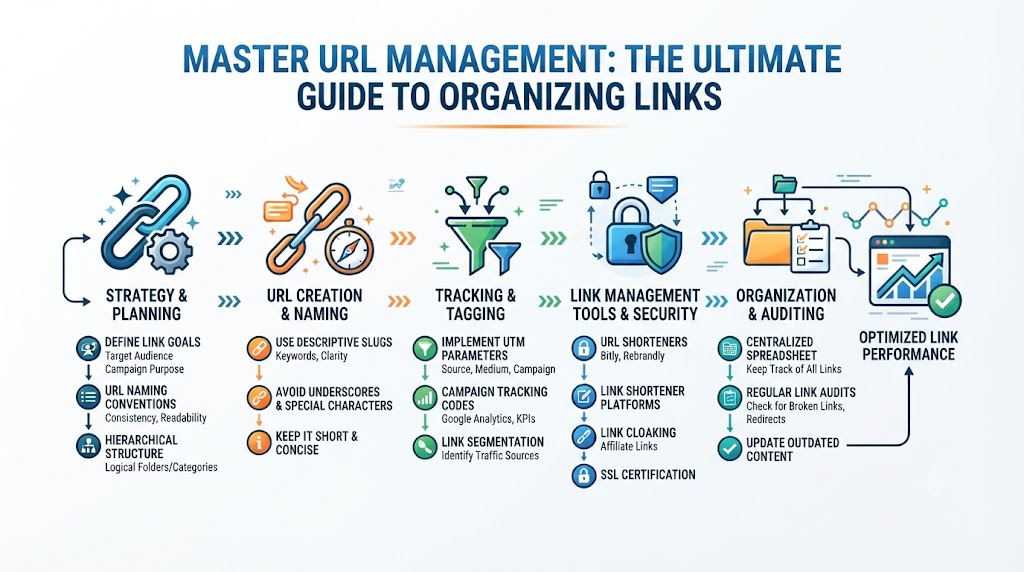
Every day, digital professionals, creators, and marketers deal with hundreds of web links. From campaign landing pages and blog posts to social media profiles and client portfolios, URLs form the backbone of your digital presence. However, as your online assets grow, keeping track of these web addresses becomes increasingly chaotic. Scattered bookmarks, broken links, and unorganized spreadsheets lead to lost time, bad user experiences, and damaged search engine rankings.In this guide, you will learn the fundamentals of modern link management, why broken link tracking matters for SEO, how creators and marketers can leverage link portfolios, and how a dedicated tool like URLsNow simplifies digital asset organization.
What Is a URL Management Tool?
Definition
A URL management tool is a software solution designed to store, categorize, monitor, and share web links from a centralized dashboard. Rather than relying on simple browser bookmarks that stay tied to one device, a link management platform stores your digital assets in the cloud, making them accessible, searchable, and collaborative across teams.
How URL Management Works
At its core, a link management platform functions as a database for your web addresses. When you save a link, the system lets you:
- Add meta tags, notes, and custom categories for quick filtering.
- Group related links into dedicated collections or folders.
- Continuously ping the destination page to check its server status and HTTP response codes.
- Share grouped links publicly or privately with clients, colleagues, and followers.
Why Link Organization Matters
Without a clear system, links quickly become scattered across emails, chat apps, document footers, and local browser folders. According to web standards outlined by the W3C, maintaining consistent URI structures and link availability is vital for long-term web architecture. Proper link organization ensures you never lose access to high-value resources, internal documents, or critical campaign assets.
Benefits of Centralized URL Management
Centralizing your link infrastructure provides immediate clarity. It reduces visual clutter, eliminates redundant file sharing, speeds up daily workflows, and prevents team members from using outdated or incorrect URLs in marketing materials.
Why Link Management Is Important
Effective link organization is not just about keeping a clean workspace—it directly impacts productivity, user experience, and search performance.
 Scrambled Bookmarks & Loose Links       Centralized Link Platform (e.g., URLsNow)
 ┌────────────────────────────────┐      ┌────────────────────────────────────────┐
 │ • Broken links go unnoticed    │  ──► │ • Automatic HTTP status pings          │
 │ • Lost campaign assets         │  ──► │ • Grouped collections & custom tags    │
 │ • Fragmented team sharing      │  ──► │ • Unified analytics & digital footprint│
 └────────────────────────────────┘      └────────────────────────────────────────┘
Better Organization
Grouping resources by project, department, or content type prevents clutter. When every link has a designated folder and tag, finding specific landing pages or reference materials takes seconds instead of minutes.
Improved Productivity
Knowledge workers spend hours each week searching for documents and links. A centralized URL organizer tool streamlines resource retrieval, letting your team focus on high-impact tasks.
Easier Collaboration
When working on cross-departmental campaigns, sharing individual links via instant messages leads to miscommunication. A single dashboard where team members access pre-approved collections ensures everyone works with the correct assets.
Better User Experience
Nothing frustrates a visitor more than clicking a link that leads to a 404 error page. Keeping your outbound and social links organized and active provides a seamless journey for your audience.
Stronger SEO Performance
Search engines like Google prioritize user experience and site health. As detailed in Google Search Central, dead ends and broken redirect chains waste search engine crawl budget and harm indexing. Regular monitoring keeps your link structure healthy.
Consistent Brand Presence
Your web links represent your digital storefront. Managing your public-facing links through unified bio pages and portfolios ensures your branding remains consistent across all social networks and media outlets.
Essential Features of a Modern Link Management Platform
Modern platforms offer sophisticated organization tools tailored for teams and power users.
| Feature Area | Basic Tools (Bookmarks) | Advanced Platform (URLsNow) |
| Storage & Access | Local browser memory | Cloud-based, accessible anywhere |
| Health Check | Manual clicking required | Automatic broken link monitoring |
| Categorization | Basic folders | Multi-tagging, search, & collections |
| Sharing | Export HTML file | Public bio pages, portfolios, & team access |
| Campaign Support | None | Grouped destination tracking |
URL Organization
A robust platform gives you complete control over how links are saved. You can add titles, descriptions, custom thumbnails, and notes to every saved URL for easy reference.
Folder & Collection Management
Group your saved links into logical hierarchies using URL Collections. For example, you can create separate collections for Client Onboarding, Q3 Social Assets, or Research Sources.
Tagging & Categorization
Folders provide high-level structure, while tags offer multi-dimensional filtering. Tagging a link with #landingpage, #promo, and #2026 allows you to find it instantly regardless of which collection it lives in.
Search & Filtering
Advanced search functionality lets you query your link repository by domain name, custom tag, title string, or creation date, eliminating manual scrolling.
Link Sharing
Instead of sending ten separate links in an email, package them into a single curated collection link to share with stakeholders or clients.
Team Collaboration & Access Management
Granular control lets administrators assign view, edit, or admin permissions across collections, ensuring team members only access relevant materials.
Automatic Broken Link Monitoring
Why Broken Links Matter
Over time, web pages change, domains expire, and permalinks get restructured. This natural process is known as “link rot.” Without automatic broken link monitoring, broken URLs go unnoticed until a customer or client reports them.
SEO Impact & User Experience
When search engine crawlers encounter frequent 404 errors on your site or landing pages, it signals poor maintenance. Search platforms like Ahrefs emphasize that broken links waste internal link equity and degrade visitor trust.
Website Maintenance & Link Auditing
Using an automated URL health monitoring tool eliminates manual link audits. The system periodically tests your saved links in the background, alerting you the moment a destination returns a 404, 500, or broken redirect status code so you can fix it immediately.
Campaign Link Management for Marketers
Marketers run complex campaigns across multiple distribution channels, requiring precise link organization.
  [ Email Campaign ]   ──┐
  [ Social Media Ads ] ──┼──► [ Centralized Campaign Hub ] ──► [ Healthy Landing Pages ]
  [ Affiliate Partners]──┘
Landing Pages & Social Media
Marketing campaigns often use dozens of dedicated landing pages. Using a campaign link management tool allows marketers to group campaign links by channel (e.g., paid search, influencer posts, newsletter blasts) to ensure every URL is active before launching.
Email Campaigns & Affiliate Marketing
In email marketing, sending a broadcast with a broken link can ruin a promotion. Pre-checking your links through a link platform ensures subscriber traffic lands on the correct product pages. Similarly, affiliate marketers can organize and verify partner tracking links to avoid lost commissions.
Content Promotion & Marketing Analytics
Keeping promotional links organized in dedicated campaign hubs makes it simple to audit historical performance and update destination URLs across channels when promotions change.
Link Portfolio Management for Professionals
Whether you are a freelancer, consultant, agency owner, or job seeker, showcasing your best work requires a clean presentation.
                        ┌──► Articles & Publications
                        ├──► Case Studies & Case Results
 [ Professional Bio ] ──┼──► Video Projects & Demos
                        ├──► Certifications & Credentials
                        └──► Social & Business Profiles
Using a link portfolio management system allows you to build a structured showcase containing:
- Articles & Publications: Highlight your written work and press coverage.
- Websites & Projects: Share live links to client sites or design samples.
- Videos & Media: Group multimedia assets into interactive portfolios.
- Certifications & Case Studies: Prove your expertise with direct links to official credentials.
Organizing your work into a polished portfolio gives potential clients a single, professional destination to evaluate your experience.
Free Link in Bio Tool for Creators
For social media creators, bio link real estate is limited. Platforms like Instagram and TikTok restrict users to a single link in their profile header.
  [ Instagram / TikTok / X ]
             │
             ▼
  [ Free Link in Bio Page ]
    ├──► Latest YouTube Video
    ├──► Featured Store Product
    ├──► Newsletter Signup
    └──► Portfolio & Contact
Social Media Profiles & Personal Branding
A free link in bio tool turns a single profile URL into a custom landing page that houses all your essential channels, recent content, store links, and newsletter signups.
Creator Portfolios & Discoverability
Instead of constantly changing your bio link every time you release a new video or podcast, update your central bio dashboard. Your followers always find your latest updates without leaving broken paths behind.
Content Link Management for Bloggers & Publishers
Managing a high-volume blog requires ongoing link upkeep.
Managing Blog URLs & Organizing Articles
As your library grows to hundreds of posts, tracking internal resources, affiliate links, and reference sources becomes challenging. A content link management tool allows bloggers to maintain an organized index of high-performing posts for easy internal linking.
Updating Older Content & Content Maintenance
Comprehensive SEO studies by Semrush highlight that updating legacy content yields substantial organic traffic gains. Having a organized system lets you replace dead outbound links and update old affiliate URLs across your entire content archive quickly.
Digital Footprint Management
Your digital footprint consists of every profile, publication, post, and domain registered under your name or business.
                        ┌──► Social Profiles (LinkedIn, X, YouTube)
                        ├──► Published Guest Posts & Media Features
 [ Digital Footprint ]  ──┼──► Active SaaS Apps & Dashboards
                        ├──► Brand Domain Names & Subdomains
                        └──► Public Case Studies & Portfolios
Online Identity & Brand Reputation
Unmonitored web assets—such as abandoned landing pages, outdated social profiles, or broken external links—can harm your brand reputation.
Digital Asset Organization
Using a digital footprint management tool gives you an audited inventory of your online presence. By keeping track of every active link tied to your brand, you protect your identity and maintain a professional online image.
URLsNow for Different User Types
Different professionals use link platforms to solve unique workflow challenges:
Bloggers
Organize internal reference links, verify external affiliate links, and maintain clean content archives.
Content Creators
Build customized Link in Bio pages and route social traffic to monetized assets without hassle.
Digital Marketers
Store UTM-tagged campaign links, organize landing page variants, and perform pre-launch link health checks.
Businesses
Centralize internal documentation, client-facing resources, and employee onboarding links in organized collections.
Agencies
Manage client link libraries, share curated resource folders, and maintain client portfolios from a single hub.
Developers
Save API documentation, code repositories, staging environments, and bug tracker links with customizable tags.
Freelancers
Showcase past work, share proposal resources, and deliver final project deliverables via professional link collections.
Students
Collect research sources, bookmark academic citations, and group study materials by course or project.
Best Practices for Managing URLs Effectively
To get the most value out of your link management strategy, follow these core principles:
- Organize links by category: Structure folders by function, project, or department rather than dumping everything into a single list.
- Monitor broken links regularly: Set up automated URL health tracking to flag 404 errors before your users encounter them.
- Maintain updated URLs: Audit destination pages quarterly to ensure redirects are active and destinations are accurate.
- Use meaningful naming conventions: Title saved links with descriptive labels and actionable tags instead of raw URLs.
- Review campaigns periodically: Archive temporary promotional links once a campaign ends to keep your workspace clean.
- Centralize important links: Store critical business assets in cloud-based dashboards rather than local browser bookmarks.
Common URL Management Mistakes
Avoid these common pitfalls when managing your digital links:
- Losing important URLs: Storing links across sticky notes, chat channels, and browser histories leads to lost assets. Solution: Save every resource directly into a cloud-based dashboard.
- Ignoring broken links: Leaving dead links on your website hurts user experience and SEO. Solution: Enable automatic monitoring pings.
- Poor organization: Creating deep, nested folder hierarchies makes links hard to locate. Solution: Use broad collection folders paired with flat tag structures.
- Outdated campaign links: Sending users to expired promotional pages damages trust. Solution: Review campaign folders prior to email and ad deployments.
The Future of URL Management
As the web continues to grow, link management is shifting from simple bookmark storage to intelligent asset orchestration.
  Traditional Bookmarking              Modern & Future Management
  ┌───────────────────────┐            ┌────────────────────────────────────────┐
  │ • Manual saving       │  ───────►  │ • Automated health checks & pings      │
  │ • Local browser ties  │            │ • Multi-platform link-in-bio hubs      │
  │ • Static list display │            │ • Smart categorization & tag filtering │
  └───────────────────────┘            └────────────────────────────────────────┘
Future trends highlight automated link auditing, AI-assisted asset categorization, and unified digital footprint management. As multi-platform content creation becomes the norm for businesses and creators alike, having a reliable system to curate and preserve web links remains vital for long-term digital organization.
How URLsNow Helps Users Stay Organized
URLsNow provides a comprehensive environment built to solve modern link management challenges. Rather than juggling separate bookmarking tools, broken link checkers, and bio link builders, URLsNow combines these features into one dashboard.
                            ┌──► Central Dashboard & Search
                            ├──► Automated URL Health Tracking
 [ URLsNow Platform ] ──────┼──► Custom URL Collections & Tags
                            ├──► Link Portfolio Showcase
                            └──► Free Link in Bio Pages
Key capabilities include:
- Central Dashboard: Access all your saved links, collections, and campaign resources from any browser.
- Link Monitoring: Automated background checks verify your saved URLs, helping you fix broken links instantly.
- URL Collections: Group links into shareable, organized folders tailored for projects or clients.
- Link Portfolio: Build professional visual showcases for your work, projects, and credentials.
- Link in Bio: Create custom, branded landing pages for your social media profiles.
By centralizing link organization and monitoring, URLsNow helps you protect your brand’s digital footprint while saving time every day. Explore the platform’s features on the URLsNow Dashboard or browse guidance in the URLsNow Help Center.
Frequently Asked Questions (FAQ)
1.What is a URL management tool?
A URL management tool is a cloud-based platform that allows users to save, organize, categorize, monitor, and share web links from a centralized dashboard. Unlike standard browser bookmarks, a URL management tool offers advanced features such as folder collections, tagging, automatic broken link monitoring, and team sharing capabilities.
2.Why is link management important for businesses?
Link management is essential for businesses because it prevents resource loss, improves team collaboration, and maintains brand consistency. Centralizing company URLs ensures employees access up-to-date documents and promotional materials, while automated monitoring prevents customers from landing on dead or broken campaign pages.
3.How does automatic broken link monitoring work?
Automatic broken link monitoring regularly tests your saved URLs in the background by sending HTTP requests to destination servers. If a server returns an error status code (such as 404 Not Found or 500 Server Error), the platform alerts you so you can update or remove the broken link immediately.
4.What is URL health monitoring?
URL health monitoring is the process of tracking the operational status, redirect chains, and response times of saved links over time. It ensures that critical landing pages, affiliate resources, and outbound links remain active, accessible, and free of broken redirects that could harm user experience or search rankings.
5.What is a link portfolio?
A link portfolio is a curated, public or private showcase that groups important web links, case studies, published articles, media files, and project samples into a professional layout. Freelancers, creators, and agencies use link portfolios to demonstrate expertise and present their best work to potential clients.
6.How does a link in bio tool help creators?
Social media platforms like Instagram, TikTok, and X limit users to a single link in their profile bio. A link in bio tool creates a customizable landing page that houses all a creator’s important links—such as store products, recent videos, newsletter signups, and social channels—allowing followers to explore content easily.
7.Why should digital marketers use a campaign link management tool?
Digital marketers manage numerous URLs across social ads, email marketing, and partner networks. A campaign link management tool organizes these links into structured groups, verifies their health before launch, and makes it easy to update destination URLs across promotional channels.
8.Can URL management improve search engine optimization (SEO)?
Yes, efficient link management indirectly supports SEO. Fixing broken outbound links and maintaining clean internal URL structures improves user experience and crawl efficiency. Search engines prioritize sites that offer dead-end-free navigation and reliable user pathways.
9.Who should use URLsNow?
URLsNow is built for anyone who manages multiple web links, including content creators, digital marketers, bloggers, agency owners, freelancers, software developers, and students. It offers tailored features like URL collections, health monitoring, link portfolios, and bio pages for diverse user needs.
10.How often should web links be audited?
Web links should ideally be monitored continuously through automated tools. For manual reviews, auditing your primary campaign links, social bio links, and high-traffic blog posts on a monthly or quarterly basis helps catch redirect changes and domain expirations early.
Conclusion
Managing web links effectively is a foundational requirement for navigating the modern web. Scattered bookmarks, broken campaign links, and unorganized digital assets lead to lost productivity, poor user experiences, and damaged search visibility.By implementing a structured approach—categorizing links into clear collections, utilizing custom tagging, and enabling automatic health tracking—you ensure your digital assets remain accessible and functional.
Leave a Reply