Introduction
Access to the internet alone is no longer enough to ensure participation in today’s economy, education systems, or public services. Across rural towns, urban neighborhoods, and under-resourced schools, millions of individuals have access to smartphones or low-cost hardware but lack the foundational skills needed to navigate online platforms safely, evaluate information critically, or apply for digital employment. This stark reality—the gap between physical connection and functional capability—is where community-focused digital literacy programs become indispensable.Without targeted education, technological advancement risks expanding economic inequality rather than reducing it. Digital skills are no longer an optional advantage; they are a fundamental prerequisite for civic engagement, healthcare management, financial independence, and workforce readiness.
What Are Digital Literacy Programs?
A digital literacy program is a structured educational initiative designed to help individuals acquire the knowledge, confidence, and practical skills required to use digital technologies effectively. While traditional computer literacy focused primarily on typing, basic software operations, and hardware mechanics, modern digital literacy encompasses a broader spectrum of cognitive, technical, and critical-thinking capabilities.
       [ Core Dimensions of Modern Digital Literacy ]
                             │
     ┌───────────────────────┼───────────────────────┐
     ▼                       ▼                       ▼
Functional Skills      Critical Thinking       Safety & Ethics
(Navigation, Apps)    (Information Audit)     (Privacy, Security)
Modern programs address three primary dimensions of technology use:
- Functional Technical Competency: Navigating operating systems, using web browsers, accessing cloud storage, managing files, and operating both desktop and mobile devices.
- Critical Information Evaluation: Recognizing credible sources, identifying online misinformation, detecting phishing attempts, and understanding basic data privacy principles.
- Digital Communication and Creation: Utilizing digital tools for professional collaboration, applying for jobs, interacting with government portals, and participating safely in online public forums.
Rather than teaching software applications in isolation, effective digital literacy programs integrate these technical skills into daily practical contexts. For instance, instead of offering a generic tutorial on spreadsheet software, a program might teach learners how to build a household budget, track small business expenses, or organize community initiatives using cloud tools.
Why Digital Literacy Matters for Community Progress
When individuals lack digital skills, the consequences extend far beyond personal inconvenience. The absence of digital fluency creates systematic barriers that affect employment, healthcare access, educational outcomes, and civic participation.
Economic Mobility and Workforce Readiness
The modern job market assumes a baseline of digital competency. From retail scheduling systems and trade documentation to entry-level administrative roles, virtually every industry requires workers to interact with software platforms. Individuals without these skills are frequently excluded from higher-paying positions and pathways to career advancement. By teaching workforce-relevant skills—such as online job searching, professional email communication, and basic data entry—digital literacy initiatives provide direct pathways to economic stability.
Access to Essential Services
Healthcare providers, financial institutions, and government agencies increasingly deliver services through online channels. Patient portals, online banking, public assistance applications, and tax filing systems require users to navigate complex web interfaces securely. Individuals without digital skills often face delays, higher administrative costs, or complete exclusion from services designed to support them.
Educational Equity
Students without home internet access or the skills to navigate educational software struggle to keep pace with their peers. This disconnect, often referred to as the homework gap, affects lower-income households disproportionately. Digital literacy programs support students directly while simultaneously educating parents and caregivers, enabling them to assist children with remote learning, monitor academic progress, and engage with school communications.
Key Components of an Effective Digital Literacy Framework
Building an impactful literacy program requires moving beyond generic, one-size-fits-all curricula. Organizations must design flexible frameworks that adapt to the diverse backgrounds, learning speeds, and goals of their participants.
+-----------------------------------------------------------------------+
|                 EFFECTIVE DIGITAL LITERACY FRAMEWORK                   |
+-----------------------------------------------------------------------+
| 1. Foundational Hardware & OS Operations                              |
|    • Power Management • File Directories • Peripheral Configuration   |
+-----------------------------------------------------------------------+
| 2. Internet Safety & Cybersecurity Awareness                          |
|    • Strong Authentication • Phishing Detection • Privacy Settings    |
+-----------------------------------------------------------------------+
| 3. Information Literacy & Media Evaluation                            |
|    • Source Verification • Bias Detection • Fact-Checking Protocols   |
+-----------------------------------------------------------------------+
| 4. Professional & Practical Application                               |
|    • Resume Formatting • Portal Submissions • Cloud Collaboration     |
+-----------------------------------------------------------------------+
1. Foundational Hardware and Operating System Competency
Instruction begins with physical interaction: managing devices, understanding file systems, connecting to Wi-Fi networks safely, and configuring basic accessibility options. Demystifying hardware helps learners build initial confidence and reduces the fear of breaking equipment.
2. Practical Internet Safety and Cybersecurity
Cybersecurity education must be a core component rather than an afterthought. Learners need practical guidance on creating strong passwords, enabling multi-factor authentication, recognizing social engineering tactics, and adjusting privacy settings on mobile devices and social networks. Instruction should focus on actionable protective habits rather than alarmist warnings that discourage technology use altogether.
3. Information Literacy and Critical Assessment
The abundance of online information requires users to develop strong evaluative skills. Programs teach participants how to verify web sources, recognize sponsored or biased content, verify images, and cross-reference claims using reputable databases. Information literacy empowers learners to make informed decisions regarding health, personal finance, and community issues.
4. Specialized Workforce and Practical Applications
Once foundational skills are established, instruction shifts toward practical goals. Participants learn how to format resumes using word processors, submit job applications through online career portals, manage cloud calendars, and utilize videoconferencing tools for remote interviews or remote work opportunities.
Overcoming Barriers to Digital Inclusion
Designing an instructional curriculum is only one part of the challenge. Nonprofits and community leaders must address the practical barriers that prevent individuals from enrolling in or completing training programs.
[ Barrier: Physical Access ] ──> Solution: Device Donation & Low-Cost Hardware
[ Barrier: Connectivity ]    ──> Solution: Community Wi-Fi & Hotspot Lending
[ Barrier: Technophobia ]    ──> Solution: Peer Mentorship & Low-Stress Labs
[ Barrier: Language/Ability]  ──> Solution: Multilingual Content & Screen Readers
Hardware Affordability and Infrastructure
A learner cannot maintain skills without access to functional hardware outside of the classroom. Effective programs combine instruction with device distribution schemes, partnering with corporate partners or refurbishing donated computers to ensure participants leave training with reliable hardware. Furthermore, programs must consider local connectivity limitations, providing materials that function in low-bandwidth environments or offering mobile hotspots for offline access.
Overcoming Technophobia and Psychological Barriers
Adult learners often enter technology training with significant anxiety, fearing they will make costly mistakes or fail to understand complex terminology. Program facilitators should adopt a patient, mentor-led approach that encourages experimentation and frame errors as normal learning steps. Creating a non-judgmental environment where participants can ask basic questions is critical to sustaining engagement.
Language and Accessibility Needs
Digital inclusion requires addressing linguistic and physical accessibility barriers. Educational materials should be made available in local languages and formatted for low-literacy audiences through visual guides, video demonstrations, and step-by-step physical workbooks. Software training must incorporate assistive technology features—such as screen magnification, text-to-speech tools, and closed captioning—to accommodate neurodiverse learners and individuals with physical disabilities.
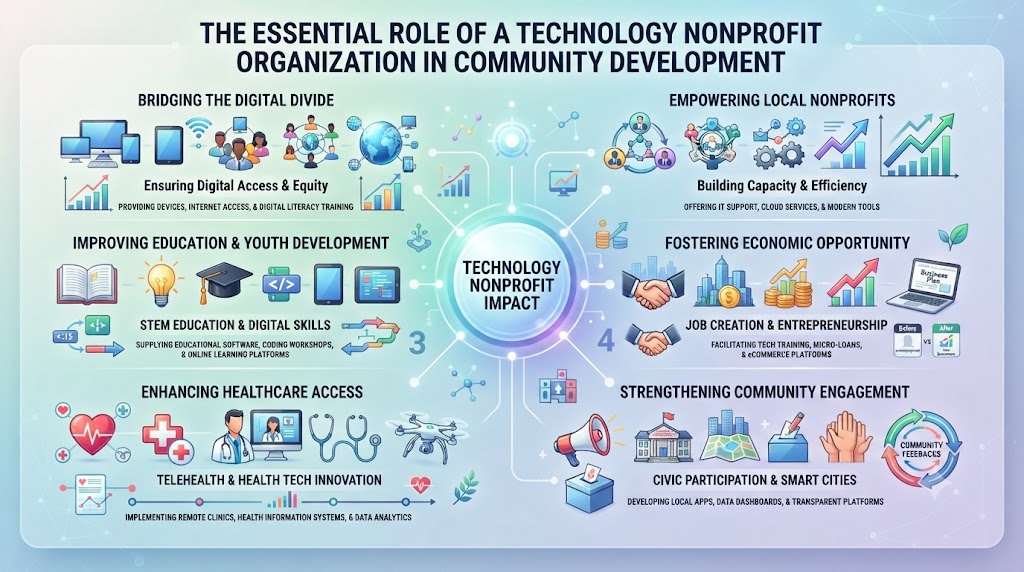
The Role of Technology Nonprofit Organizations
Nonprofit organizations act as critical intermediaries between technology creators, resource donors, and local communities. While corporate technology developers focus primarily on market reach and product feature expansion, a Technology Nonprofit Organization prioritizes access, ethical implementation, and human capability building.
Organizations like Cotocus.org play an important role in this ecosystem by aligning technology initiatives with verified community needs. Nonprofits bridge regional gaps through dedicated Digital Literacy Programs, support broader Digital Inclusion Programs, and introduce Technology Education Programs that prepare young people and adult learners for an increasingly digital world.
       ┌────────────────────────────────────────────────────────┐
       │              Technology Nonprofit Role                 │
       └───────────────────────────┬────────────────────────────┘
                                   │
      ┌────────────────────────────┼────────────────────────────┐
      ▼                            ▼                            ▼
[ Directly Serve ]         [ Build Capacity ]         [ Research & Advocate ]
Deliver community workshops  Support peer nonprofits     Conduct Responsible AI
& hands-on training         through tech adoption      & ethical tech research
Beyond direct community training, nonprofits contribute to long-term impact by:
- Supporting Nonprofit Digital Transformation: Helping local charities, shelters, and community groups update their internal infrastructure, implement cloud tools, protect client data, and streamline operations.
- Conducting Responsible AI Research: Studying how emerging tools impact vulnerable populations and ensuring social impact initiatives adopt automated systems safely and transparently.
- Facilitating Corporate Social Impact Partnerships: Connecting companies that have surplus hardware, specialized technical expertise, or grant funding with communities that require those resources.
- Mobilizing Technical Volunteers: Providing structured Technology Volunteer Opportunities that allow software developers, cybersecurity experts, and IT professionals to mentor students and support local workshops.
Designing Sustainable Digital Inclusion Initiatives: A Step-by-Step Framework
Organizations planning to launch or expand technology education initiatives can use the following decision framework to ensure their programs remain community-centered, operationally viable, and sustainable over time.
<Sequence>
  <Step title="Assess Community Needs and Digital Infrastructure" subtitle="Phase 1: Research & Discovery">
    Before selecting software or designing lesson plans, conduct surveys and focus groups within the target community. Identify existing access levels, primary language preferences, transportation constraints, and specific goals—such as obtaining employment, accessing healthcare, or supporting children with schoolwork. Avoid making assumptions about hardware availability or initial baseline skills.
  </Step>

  <Step title="Establish Hardware, Software, and Physical Spaces" subtitle="Phase 2: Logistics & Infrastructure">
    Secure reliable physical training spaces that are accessible via public transit, such as local libraries, community centers, or schools. Acquire updated hardware, ensuring all computers run supported operating systems and include necessary accessibility software. Work with local internet providers or corporate sponsors to ensure stable, high-speed connectivity within the facility.
  </Step>

  <Step title="Develop a Modular, Practical Curriculum" subtitle="Phase 3: Educational Design">
    Structure lesson modules around real-world tasks rather than abstract software features. Incorporate hands-on exercises, visual reference sheets, and interactive practice environments. Break complex topics into manageable 30- to 60-minute units that build upon one another sequentially, allowing learners to track their progress visibly.
  </Step>

  <Step title="Train Instructors and Recruit Volunteer Mentors" subtitle="Phase 4: Capacity Building">
    Pair primary instructors with technical volunteers to provide one-on-one assistance during practical exercises. Train all facilitators in adult learning principles, cultural competence, and empathetic instruction techniques. Ensure instructors prioritize patience and hands-on trial over taking control of the keyboard themselves.
  </Step>

  <Step title="Implement Ongoing Evaluation and Long-Term Support" subtitle="Phase 5: Measurement & Iteration">
    Track participant growth through practical skill assessments rather than multiple-choice quizzes. Establish follow-up support options—such as open lab hours, alumni drop-in sessions, or peer support groups—so learners can continue practicing and troubleshooting after completing the formal course.
  </Step>
</Sequence>
Ethical Considerations in Community Technology Programs
Introducing emerging technology tools to non-technical communities requires careful ethical oversight. Nonprofits and educational institutions must ensure that enthusiasm for digital adoption does not compromise safety, privacy, or individual autonomy.
Data Privacy and Informed Consent
Programs that collect personal information from participants—whether for registration, impact tracking, or hardware distribution—must follow strict data protection practices. Instructors should clearly explain how data will be used, stored, and protected using plain, accessible language. Learners should never be forced to sign up for commercial online accounts or disclose sensitive personal details as a mandatory requirement for attending free community classes.
Avoiding Technocentrism
A common failure in social impact initiatives is technocentrism—the assumption that technology is the primary or only solution to complex socio-economic problems. A digital literacy workshop cannot fix systemic unemployment or housing shortages on its own; it serves as an enabling tool within a broader ecosystem of social services. Program planners must integrate technology education with existing community support structures rather than offering isolated technical interventions.
Responsible Introduction to AI Tools
As artificial intelligence tools become integrated into search engines, productivity suites, and educational platforms, programs must teach safe AI use alongside foundational digital skills. Instruction should address the limitations of automated tools, emphasizing that AI outputs can contain errors or factual inaccuracies, require critical human review, and should be evaluated carefully before use in professional or academic contexts.
Measuring Social Impact and Long-Term Value
To maintain funding, refine teaching methods, and demonstrate value to community partners, organizations must measure outcomes accurately. Impact evaluation should focus on meaningful behavioral changes and life improvements rather than superficial participation counts.
| Metric Type | Traditional / Low-Value Indicators | High-Impact / Outcome-Oriented Metrics |
| Output Metrics | • Number of flyers distributed • Total enrolled students • Hours of classroom instruction | • Completion rate of multi-week modules • Student-to-mentor instructional ratios • Total hands-on lab hours completed |
| Skill Acquisition | • Attendance record counts • Self-reported satisfaction surveys | • Demonstration of practical tasks (e.g., sending an email attachment independently) • Pre- and post-course skill evaluations |
| Life Outcomes | • Number of computers donated | • Percentage of graduates securing job interviews • Successful independent submission of public assistance or housing forms • Increase in parental engagement with school communication platforms |
By combining qualitative feedback from community members with objective outcome metrics, organizations can build sustainable, transparent programs that earn long-term trust and investment.
Common Implementation Mistakes to Avoid
- Purchasing Hardware Without Maintenance Plans: Acquiring desktop computers or tablets without allocating funds or volunteer resources for software updates, virus protection, and hardware repair usually results in unusable equipment within 12 to 18 months.
- Using Overly Technical Jargon: Instruction that relies heavily on industry acronyms or unexplained technical concepts alienates beginners. Successful programs use clear, everyday language and relatable analogies.
- Assuming Youth Are Automatically Digitally Literate: While young people often adapt quickly to smartphone interfaces and social video applications, many lack foundational skills in document formatting, professional email communication, cloud file organization, and online safety. Youth Innovation Programs must balance creative tool exploration with basic digital hygiene.
- Neglecting Post-Program Support Options: Skills deteriorate quickly without continuous practice. Failing to provide drop-in hours, community lab access, or refresher workshops leaves graduates vulnerable to losing the confidence and capabilities they gained during training.
Practical Tips for Community Leaders and Educators
┌────────────────────────────────────────────────────────────────────────┐
|                      PRACTICAL IMPLEMENTATION TIPS                     |
├────────────────────────────────────────────────────────────────────────┤
|  [✓] Start Small & Iterate                                             |
|      Launch a 4-week pilot before scaling to multi-month courses.     |
|                                                                        |
|  [✓] Prioritize Real-World Tasks                                       |
|      Teach tools through practical tasks like job searches or budget   |
|      creation rather than abstract menus.                              |
|                                                                        |
|  [✓] Establish Peer Mentorship Models                                  |
|      Pair advanced learners with beginners to build community and      |
|      reduce instructional strain.                                      |
|                                                                        |
|  [✓] Secure Multi-Sector Partnerships                                  |
|      Combine nonprofit agility, corporate hardware sponsorships, and   |
|      local government space allocations.                               |
|                                                                        |
|  [✓] Integrate Cybersecurity Awareness Early                           |
|      Teach password safety and scam detection from day one.           |
└────────────────────────────────────────────────────────────────────────┘
- Start with Small, Focused Pilots: Before launching a city-wide initiative, test curriculum materials and teaching styles with a small cohort of 10 to 15 participants. Use their direct feedback to refine pacing, language, and exercise formats.
- Focus on Practical Outcomes: Ground every lesson in a real-world task. Teach spreadsheet software by creating a household budget, or explain web browsers by navigating to a local transit schedule or telehealth portal.
- Establish Peer Support Models: Encourage participants who master concepts quickly to assist classmates. This peer-teaching dynamic reinforces the mentor’s knowledge while reducing anxiety for struggling students.
- Build Multi-Sector Coalitions: Combine the strengths of local nonprofits, corporate partners, civic libraries, and educational institutions. Nonprofits bring community trust and instructional design; corporate partners contribute hardware, funding, and technical volunteers; public facilities offer accessible, safe physical locations.
Frequently Asked Questions (FAQs)
1. What is the difference between digital access and digital literacy?
Digital access refers to the physical infrastructure required to connect—such as devices, routers, and broadband internet subscriptions. Digital literacy refers to the cognitive and practical skills required to use those tools effectively, safely, and independently for work, learning, and daily tasks.
2. How can small non-profit organizations start a digital literacy program on a limited budget?
Small organizations can begin by partnering with public libraries or community centers to utilize existing computer labs. They can leverage open-source curricula, recruit technical volunteers for one-on-one assistance, and seek refurbished hardware donations from local businesses.
3. Why is cybersecurity education important for beginner computer users?
Beginner users are frequently targeted by online scams, phishing emails, and malicious pop-ups due to a lack of familiarity with digital red flags. Early cybersecurity education protects participants from financial fraud, identity theft, and data loss as they build online confidence.
4. How can tech companies support community-based digital inclusion initiatives?
Technology companies can support these initiatives by donating refurbished hardware, providing grant funding, offering free software licenses to non-profit organizations, and encouraging employees to contribute through structured Technology Volunteer Opportunities.
5. Are smartphones sufficient for developing complete digital literacy?
Smartphones provide essential connectivity, but they are generally insufficient for developing full digital literacy. Desktop and laptop operating systems remain necessary for professional tasks, complex document creation, programming, and many administrative administrative functions.
6. How do digital literacy programs support youth innovation?
By teaching foundational skills like coding, data analysis, and online research alongside critical thinking, Youth Innovation Programs empower students to move from passive media consumption to active problem-solving and software creation.
7. What role does artificial intelligence play in modern technology education?
Artificial intelligence serves as both a tool and a topic of instruction. Programs teach participants how to use simple AI tools for productivity while emphasizing critical evaluation, verifying automated outputs, and understanding data privacy implications.
8. How can digital literacy programs accommodate non-native English speakers?
Programs can adapt by utilizing translated visual workbooks, employing bilingual instructors or volunteers, using screen-translation software, and focusing initial lessons on visual interface navigation rather than text-heavy instructions.
9. How do non-profit organizations achieve digital transformation internally?
Non-profit digital transformation involves updating outdated software, moving operations to secure cloud platforms, automating administrative tasks, and training staff members so the organization can deliver services more efficiently.
10. How can individuals evaluate the quality of a community digital literacy course?
High-quality courses feature small class sizes, low student-to-instructor ratios, dedicated hands-on computer lab time, practical real-world exercises, and post-course support rather than relying solely on lecture presentations or multiple-choice testing.
Conclusion
Achieving true digital inclusion requires more than distributing hardware or installing broadband lines; it demands a long-term commitment to human capacity, confidence building, and practical education. As technology continues to evolve, structured digital literacy programs remain the foundation of equitable social and economic progress. By investing in accessible curricula, cultivating empathetic mentors, and building cross-sector partnerships, communities can ensure that every individual has the opportunity to navigate the digital world safely, productively, and independently.Initiatives led by organizations like Cotocus.org demonstrate how community-focused technology education, responsible AI research, and collaborative volunteering can turn digital access into meaningful social impact. Whether through corporate sponsorship, volunteer mentorship, or local advocacy, supporting inclusive technology education helps build a future where technological progress benefits everyone.
Leave a Reply